Understanding the Web App vs Mobile App Decision
When you are launching a startup, one of the most critical decisions you will make is choosing between building a web app vs mobile app. This decision affects your budget, timeline, target audience reach, and overall success. Yet many startup founders make this choice without fully understanding the implications.
The difference between a web app and mobile app goes beyond just where users access your product. A web app runs in a browser and works across all devices with internet access. A mobile app is built specifically for smartphones and tablets, with native versions for iOS and Android. Each approach has distinct advantages, limitations, and costs that can make or break your startup.
In this comprehensive guide, we will walk you through everything you need to know to make an informed decision about whether to build a web app or mobile app for your startup.
Table of Contents
What Is a Web App?
A web application is software that runs in your browser. Instead of downloading and installing something on your device, you simply visit a URL and start using it. Examples include Gmail, Google Docs, Slack, Trello, and Figma.
Key Characteristics of Web Apps
Web applications are accessible from any device with a browser and internet connection. You do not need to worry about different operating systems or device compatibility because a web app works the same way on Windows, Mac, iOS, and Android.
Web apps are updated instantly on the server side. When the developers push an update, every user immediately gets the new version without needing to manually download anything. There is no app store approval process, so you can ship changes whenever you want.
Building a web app requires a single codebase. Your developers write the code once, and it runs everywhere. This significantly reduces development time and cost compared to building separate applications for different platforms.
Web apps work on any device with modern browser support. This includes smartphones, tablets, desktops, smart TVs, and emerging devices. Your startup can reach users regardless of their hardware.
Web App Use Cases
Web apps are ideal when your users need to access your service from multiple devices. A project management tool, for example, benefits from being accessible on desktop for detailed work and mobile for quick updates while on the go.
Web apps work well for content-heavy applications. Educational platforms, news sites, social media apps, and productivity tools all leverage web applications successfully because they prioritize information access over device-specific features.
What Is a Mobile App?
A mobile application is software built specifically for smartphones and tablets. Native mobile apps are written in platform-specific languages. iOS apps use Swift or Objective-C, while Android apps use Java or Kotlin. There are also hybrid mobile apps that use web technologies packaged for mobile platforms.
Key Characteristics of Mobile Apps
Mobile apps offer superior performance. Because they are built for the specific hardware and operating system, mobile applications can leverage device capabilities at the system level. Apps open faster, animations are smoother, and the overall experience feels more responsive than a web app on the same device.
Mobile apps work offline. When users do not have internet connectivity, a mobile application can still function using cached data. This is impossible with traditional web applications, which require internet access to operate.
Mobile apps have deeper access to device features. If your startup needs to use the device camera, GPS, contacts, calendar, or push notifications, a native mobile app gives you more direct and reliable access to these features. A web app can access some of these through browser APIs, but with limitations.
Mobile apps live on app stores. iOS apps are listed on Apple’s App Store, and Android apps are on Google Play. This brings discoverability and credibility, but it also means your app must pass app store review processes before launching and when making updates.
Mobile App Use Cases
Mobile apps excel when your application needs to function offline. Navigation apps, note-taking apps, and productivity tools benefit from offline functionality that mobile applications provide.
Photo and video apps are better as mobile applications. Instagram, Snapchat, and TikTok leveraged native mobile app capabilities to create experiences that were not possible on web at the time of their launch.
Games are almost always built as mobile apps because they require direct hardware access and the performance that native code provides.
Location-based services like Uber and delivery apps rely on GPS, background execution, and push notifications that work best in native mobile applications.
Web App vs Mobile App: Direct Comparison
Now that we have covered the basics, let us compare web apps and mobile apps across the key factors that matter to startups.
Development Cost
Building a web application is significantly less expensive than building a mobile app. A web app requires a single development team creating one codebase that works across all devices.
Developing a native mobile app for both iOS and Android requires separate teams or specialists for each platform. This means 2x to 3x the development cost compared to a web app. If you hire a single team to build for both platforms using hybrid tools like React Native or Flutter, you reduce costs but still spend more than building a web app alone.
For a startup with limited funding, the cost difference between a web app vs mobile app can determine whether you can even launch. An early-stage startup might choose a web app not because it is the best long-term solution, but because it is the only feasible option financially.
Time to Market
Web applications launch faster. Because you are building once instead of twice, your development timeline is shorter. A simple web app might launch in 2 to 3 months. The same app built as a native mobile application for iOS and Android could take 6 to 9 months.
Speed matters for startups. The faster you can launch and start learning from real users, the better decisions you can make about your product direction.
User Acquisition and Distribution
Web apps are more accessible to users. No installation required, no app store account necessary, no storage space needed on the device. Users find your web app through a Google search or link and start using immediately.
Mobile apps have higher barriers to adoption. Users must actively search for your app in the app store, download it, install it, and make space on their device. However, app store distribution also provides built-in discovery mechanisms and credibility that a web app lacks.
Mobile apps have higher engagement. Users who download and install an app are typically more committed than someone who simply visits a website. Push notifications, home screen shortcuts, and the habit of opening apps keep users coming back.
Performance
Native mobile apps deliver superior performance. The experience feels instant, animations are smooth, and interactions are responsive. This matters enormously for user experience and retention.
Web apps have improved significantly with modern browsers and technologies like Progressive Web Apps. But they still cannot match native performance on smartphones. A web app might feel sluggish on older devices or slower internet connections, while a native app would work smoothly.
For performance-critical applications like games or real-time collaborative tools, a native mobile app is the better choice. For most business applications, modern web apps deliver acceptable performance.
Offline Functionality
This is where mobile apps have a clear advantage. A native mobile application can store data locally and function without internet connectivity. This capability is essential for apps used in areas with unreliable internet or for applications that need to work during commutes or travel.
Web applications require internet access. Progressive Web Apps can cache some content for offline viewing, but full offline functionality is not possible with web technology.
Access to Device Features
Native mobile apps have direct access to device hardware. The camera, microphone, GPS, accelerometer, contacts, calendar, and other device features are accessible with native code.
Web applications have limited device access through browser APIs. You can access some features like location and camera, but the browser restricts direct hardware access for security reasons. Some features like background execution are not available to web apps at all.
Hidden Costs Startups Often Overlook
Beyond the obvious development costs, several hidden expenses affect your decision.
App Store Fees and Maintenance
Publishing an app on Apple’s App Store costs $99 per year. Google Play costs $25 one time, but you need to maintain the app indefinitely. Apple requires all app updates to go through review, which can take 24 to 48 hours. This slows down your ability to respond to bugs and ship features.
Web applications have no app store fees and no review process. You push updates directly to production whenever you want.
Platform-Specific Changes and Fragmentation
iOS and Android constantly release new versions with breaking changes. Your mobile application needs to support the current and previous versions of each platform. Over time, maintaining a mobile application across multiple platforms and versions becomes a significant ongoing expense.
A web app running in modern browsers avoids much of this fragmentation because browsers handle backward compatibility better than mobile operating systems.
Testing and Quality Assurance
Testing a web application requires checking browsers and devices, but the scope is manageable. Testing a mobile application means verifying compatibility across dozens of devices, screen sizes, and iOS and Android versions. This testing complexity adds cost and time.
The Hybrid and Progressive Web App Option
You do not have to choose between a traditional web app and a native mobile app. There are middle-ground solutions worth considering.
Progressive Web Apps
A Progressive Web App (PWA) is a web application that works like a native app. Users can install the PWA on their home screen and open it like an app. PWAs work offline, send push notifications, and access device features where supported by the browser.
Progressive Web Apps provide many of the advantages of a native mobile app without the costs and complexity. For many startups, a PWA is the perfect solution. You build once as a web app, and it works across all devices.
However, PWAs have limitations. App store discoverability is lower than for native apps. Some device features like camera and location work but are less integrated than in native apps. And PWAs work best on Android; iOS support is more limited.
Hybrid Frameworks
Frameworks like React Native and Flutter let you write code once and compile it for iOS and Android. This reduces the cost of building a native mobile app compared to hiring separate iOS and Android teams.
Hybrid apps have trade-offs. They do not perform quite as well as truly native apps. Complex animations and real-time features can be challenging. And you still need to maintain two separate platforms, though with less code duplication than building truly native.
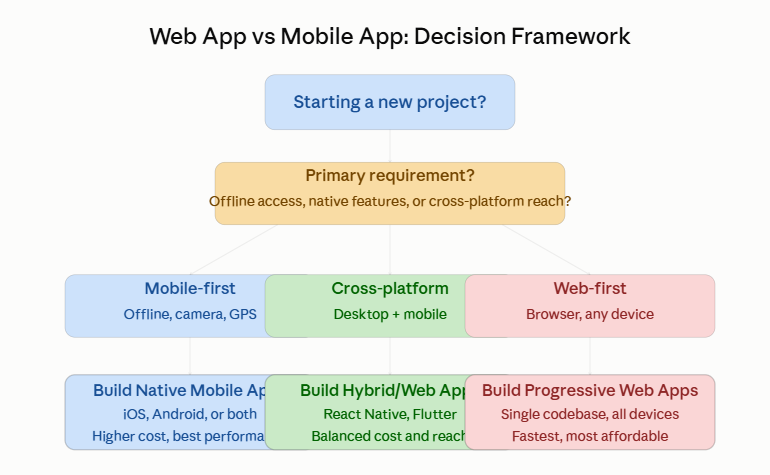
How to Choose: A Practical Framework
Here is a practical framework to help you decide between a web app and mobile app for your startup.
Start With Your Users
Ask: Where are your users? What devices do they use? Where do they access your service?
If your users are distributed across devices and operating systems, a web app is likely better. If your target audience is almost entirely on iOS or Android, a mobile app makes more sense.
Evaluate Feature Requirements
Does your application need GPS, offline functionality, or deep device integration? If yes, a mobile app is probably necessary. If your core features can work in a browser, a web app is viable.
Consider Your Budget and Timeline
Be honest about your resources. If you are bootstrapped or pre-seed, a web app or Progressive Web App is more realistic than building native mobile apps for two platforms. If you have funding and need to move quickly, a web app gets you to market faster.
Validate With Users First
Before committing to either platform, validate your idea with users. Build a simple prototype in whichever platform you can launch fastest. Learn what users actually need, then decide on your long-term platform strategy based on real data.
Plan for Evolution
Your first choice does not have to be your final choice. Many successful startups launch as web apps and build mobile apps once they have validated the market and have revenue to fund development. Slack, Trello, and Figma all started as web-first and added mobile apps later.
The Business Case for Each Option
Web App Advantages for Startups
A web application is ideal if you want to maximize reach with limited resources. You build faster, launch cheaper, and reach users across all devices. You maintain one codebase, ship updates instantly, and avoid app store gatekeeping.
A web app is the right choice if you are still figuring out your product. You can iterate quickly based on user feedback without waiting for app store approvals. This is invaluable when discovering product-market fit.
Mobile App Advantages for Startups
A native mobile application is the right choice if you need offline functionality or deep device feature access. If your application is location-based, photo-centric, or requires GPS, a mobile app will deliver a better user experience.
A mobile app is justified if your target users are primarily mobile-first and expect an app store experience. Game developers, fitness app creators, and messaging apps fall into this category.
Real-World Examples
Let us look at how successful startups made this decision.
Slack chose to launch as a web application first. The web app allowed them to iterate quickly and iterate on their core collaboration features. They added mobile apps (iOS and Android) after demonstrating strong product-market fit and securing funding.
Figma launched as a web application and remains primarily web-based. This web-first approach allowed Figma to provide sophisticated design tools across all operating systems without the complexity of maintaining native applications.
Instagram and Snapchat launched as native mobile applications because they fundamentally depended on camera features and push notifications that work best in native apps.
These examples show that successful startups choose the platform that serves their immediate needs while planning for long-term expansion.
Web Application Development at Damisrael Technologies
If you decide that a web application is the right choice for your startup, you need a development partner who understands your constraints and vision.
At Damisrael Technologies, we specialize in building web applications that are fast, scalable, and user-friendly. Our team has experience building custom web applications from simple tools to complex enterprise platforms.
We also offer Progressive Web App development if you want web app functionality with mobile app-like capabilities. And if your needs evolve, we can help you build mobile applications using modern frameworks to complement your web presence.
Our web application development process focuses on rapid prototyping, user feedback, and iterative development. We help you launch faster, learn from real users, and make data-driven decisions about your product roadmap.
Making Your Decision
Choosing between a web app vs mobile app is not a permanent commitment. The right choice depends on your users, your features, your budget, and your timeline.
Start with a web application if you want to maximize reach and minimize cost. Launch a Progressive Web App if you want web simplicity with mobile app features. Choose a native mobile app if you need offline functionality or deep device integration.
Whatever you choose, choose thoughtfully based on data about your users and your business constraints, not just what feels trendy or impressive.
Do not let this decision paralyze you. The most important thing is to launch something and start learning from real users. You can always evolve your platform choice as your startup grows.
Ready to Build Your Application?
At Damisrael Technologies, we help startups and growing businesses build web applications, mobile applications, and everything in between. Whether you are still deciding between a web app vs mobile app or ready to start development, our team can guide you through the decision and deliver results.
Contact us today to discuss your project and explore which platform is right for your startup.
Services that complement this decision:
- Custom web application development for cross-platform reach
- Mobile app development for iOS and Android
- UI/UX design to make either platform delightful
- Website optimization to ensure fast web app performance
- Cloud hosting solutions to power your application
Resources to Learn More
- MDN Web Docs: Progressive Web Apps – Learn about building web apps with native app capabilities
- Google’s Guide to App Development – Understand mobile app development basics
- Web vs Native Apps: A Comprehensive Comparison – Industry perspective on platform choices
About Damisrael Technologies
Damisrael Technologies is a web and mobile development agency serving startups, SMEs, and organizations worldwide. We help you choose the right platform for your vision and deliver applications that your users love.