Introduction: Why Website Speed Matters
How to improve website speed is one of the most important questions website owners ask. Website speed directly impacts your business. Visitors who encounter slow websites leave immediately. Search engines penalize slow sites in rankings. Conversions drop dramatically with every additional second of load time.
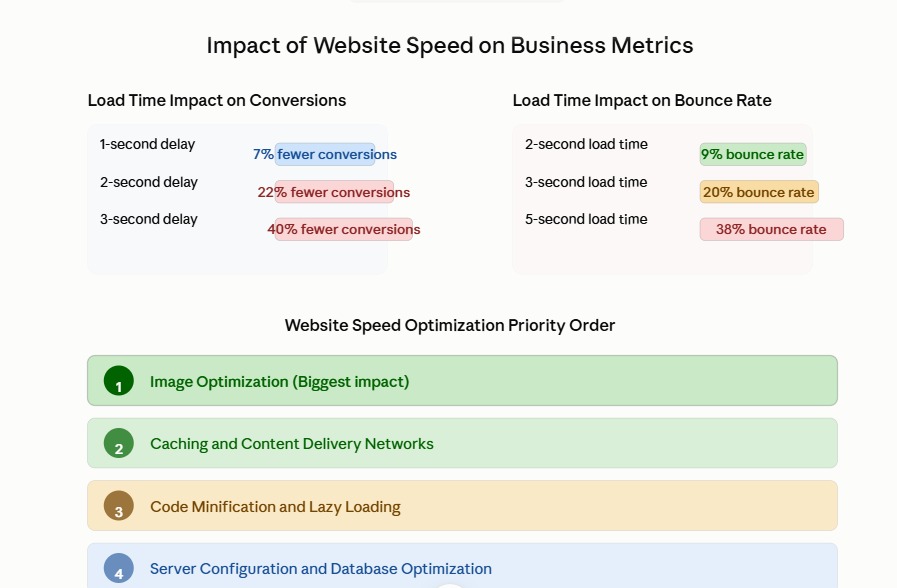
The statistics are compelling. A one-second delay in page load time reduces conversions by seven percent. A three-second delay reduces conversions by forty percent. For an e-commerce site generating one million dollars monthly, a three-second improvement in speed could increase revenue by hundreds of thousands of dollars annually.
Yet many website owners neglect speed optimization. They focus on design and content but ignore the technical foundation that makes websites fast. This is a critical mistake. Speed is not a luxury feature. Speed is a fundamental requirement that affects user experience, search rankings, and business results.
The good news is that you do not need to be a technical expert to improve website speed. This guide walks you through both technical and non-technical strategies to make your website faster. Whether you manage your website yourself or work with a development team, you will find actionable steps to improve website speed immediately.
Table of Contents
Why Website Speed Affects Your Business
Before diving into how to improve website speed, understand why it matters so much.
Website speed directly impacts user experience. Visitors expect websites to load in under three seconds. If your site takes longer, visitors leave. They never see your products or services. They never become customers.
Google uses website speed as a ranking factor. Slow websites rank lower in search results. Fast websites rank higher. This means that improving your website speed also improves your search visibility, bringing more customers through organic search.
Website speed affects mobile experience particularly. Mobile visitors are less patient than desktop visitors. A slow mobile site is essentially unusable. Given that mobile traffic represents over fifty percent of web traffic, mobile speed is critical.
Website speed also affects your brand perception. Visitors judge your business by your website experience. A slow, sluggish website signals that your business is outdated or incompetent. A fast, responsive website signals professionalism and quality.
How to Measure Website Speed
Before you can improve website speed, you need to measure it. You cannot improve what you do not measure.
The primary metric for website speed is time to first contentful paint, or FCP. This measures how long it takes before visitors see meaningful content on your page. A good FCP is under 1.8 seconds. A poor FCP is over 3 seconds.
Another critical metric is largest contentful paint, or LCP. This measures how long it takes for the main content on your page to finish loading. Google recommends an LCP of 2.5 seconds or less.
Cumulative layout shift, or CLS, measures visual stability. When page elements shift around after the page loads, it is frustrating for visitors. A good CLS score is under 0.1.
To measure your website speed, use Google PageSpeed Insights. This free tool analyzes your website and provides detailed recommendations. It also gives you specific metrics for FCP, LCP, and CLS.
Another useful tool is GTmetrix. This provides detailed performance analysis including what files are loading, which are slow, and specific optimization recommendations.
WebPageTest is another valuable tool for detailed performance analysis. Use these tools to establish a baseline of your current website speed before starting optimization work.
How to Improve Website Speed: Technical Strategies
Technical optimization is where most website speed improvements come from. These strategies require technical knowledge or developer assistance.
Optimize Images Aggressively
Images are typically the largest files on any website. Unoptimized images are the single biggest cause of slow websites. Learning how to improve website speed starts with image optimization.
Compress your images without losing quality. Use tools like TinyPNG or ImageOptim to compress images before uploading. These tools reduce image file sizes by fifty to eighty percent while maintaining visual quality.
Use modern image formats like WebP. WebP provides better compression than traditional JPEG and PNG formats. Most modern browsers support WebP. You can serve WebP to supported browsers and fall back to JPEG for older browsers.
Serve appropriately sized images. A visitor on a mobile phone does not need a 4000-pixel wide image. Use responsive images that serve different sizes to different devices. This is one of the most effective ways to improve website speed for mobile visitors.
Lazy load images. Only load images when visitors scroll them into view. Lazy loading significantly improves initial page load time because visitors see content immediately without waiting for all images to load.
Implement Caching
Caching stores frequently accessed data so it does not have to be regenerated every time. Caching is one of the most effective ways to improve website speed.
Enable browser caching. When visitors revisit your site, their browser can load many files from local cache instead of downloading them again. This dramatically improves repeat visit performance.
Implement server-side caching. Content management systems like WordPress can cache page HTML so the server does not have to regenerate pages for every visitor. Caching plugins make this easy.
Use a content delivery network, or CDN. A CDN stores copies of your website files on servers around the world. When a visitor requests your site, they receive files from the nearest CDN server rather than from your main server. This reduces latency and improves speed for geographically distant visitors.
Minify Code
Your website includes CSS and JavaScript files. These files contain whitespace and comments that are unnecessary for browsers. Minification removes this extra content, reducing file sizes.
Minify CSS. Remove unnecessary whitespace and combine multiple CSS files into one. This reduces the number of HTTP requests and reduces file sizes.
Minify JavaScript. Remove comments and whitespace from JavaScript. Combine multiple JavaScript files where possible. Be careful not to break functionality when minifying.
Modern build tools automate minification. If you use a framework like React or Vue, build tools automatically minify your code during deployment.
Enable Gzip Compression
Gzip compression reduces file sizes before transmitting them from server to browser. This is like zipping files before emailing them. The browser automatically decompresses them on receipt.
Enabling Gzip compression typically reduces file sizes by sixty to seventy percent. This is one of the easiest optimizations to implement. Most hosting providers allow you to enable Gzip with a single configuration change.
Use Lazy Loading for Content
Beyond images, lazy load other content that is not immediately visible. Lazy load videos. Lazy load iframes. Lazy load content below the fold.
Lazy loading defers loading content until it is needed. This means visitors see your main content immediately and do not wait for secondary content to load.
Optimize Your Critical Rendering Path
The critical rendering path is the sequence of steps a browser takes to render your page. Optimizing this path is how to improve website speed significantly.
Reduce render-blocking resources. JavaScript and CSS files can block page rendering. Move non-critical JavaScript to the bottom of the page. Consider loading JavaScript asynchronously. Defer CSS for non-critical styles.
Eliminate render-blocking third-party scripts. Analytics, tracking pixels, and advertising scripts can block rendering. Load these scripts asynchronously or after the page loads.
How to Improve Website Speed: Non-Technical Strategies
Not all website speed improvements require technical knowledge. Some are strategic decisions and best practices.
Simplify Your Website Design
Complex designs with many elements load slower than simple designs. A cluttered homepage with dozens of elements takes longer to render than a clean, focused homepage.
Reduce the number of elements on each page. Do you really need that carousel? Do you need all those sidebar widgets? Simplifying your design often improves speed and user experience simultaneously.
Use a lightweight theme. Some website themes are bloated with unnecessary features. Switch to a lightweight, performance-focused theme to improve website speed.
Reduce the Number of Requests
Every image, stylesheet, script, and font on your page requires a separate HTTP request. More requests mean slower loading.
Count how many requests your website makes. Aim for under fifty requests for a typical page. Use tools like GTmetrix to see exactly how many requests your site makes.
Combine files where possible. Combine multiple CSS files into one. Combine multiple JavaScript files into one. Combine multiple images into a sprite sheet.
Eliminate unnecessary requests. Remove unused fonts, icons, and scripts. Every unnecessary request slows down your site.
Choose Fast Hosting
Your hosting provider affects your website speed. Cheap, shared hosting is slower than quality hosting. All the optimization in the world cannot overcome poor hosting infrastructure.
If your website is slow and you have implemented optimization strategies, consider upgrading your hosting. Better hosting often costs only slightly more than cheap hosting but provides dramatically better performance.
Consider cloud hosting from providers like AWS, Google Cloud, or Azure. Cloud hosting scales automatically and provides excellent performance.
Use a Content Management System Efficiently
Content management systems like WordPress are convenient but can be slow if used inefficiently. Poorly coded plugins and themes create bloated websites.
Audit your plugins regularly. Disable plugins you do not use. Some plugins are poorly coded and slow down your site. Delete inactive plugins entirely.
Keep your CMS, themes, and plugins updated. Updates often include performance improvements and security fixes.
Reduce External Dependencies
Third-party scripts for analytics, tracking, advertising, and social media widgets add load time. Each external script is a network request and potential point of failure.
Minimize the number of external scripts. Only include scripts that provide clear value. Load them asynchronously or defer loading until after your page loads.
Step-by-Step Guide to Improve Website Speed
Here is a practical, step-by-step approach to improve website speed.
Step 1: Measure Your Current Speed
Use Google PageSpeed Insights and GTmetrix to measure your current website speed. Document your metrics as a baseline.
Step 2: Identify Your Biggest Opportunities
Review the recommendations from PageSpeed Insights. Which issues have the biggest impact? Which are easiest to fix? Create a prioritized list.
Typically, image optimization, caching, and minification provide the biggest improvements. Start with these.
Step 3: Implement Image Optimization
This is the single highest-impact optimization for most websites.
Compress existing images using TinyPNG or similar tools. Replace unoptimized image files with optimized versions.
Implement lazy loading for images. Most hosting providers offer plugins that enable lazy loading with a single click. Start serving WebP images to modern browsers.
Step 4: Enable Caching and CDN
Enable browser caching through your hosting control panel. Install a caching plugin if using WordPress or similar CMS. This plugin handles caching automatically.
Set up a CDN. Cloudflare offers a free CDN that is simple to implement. Premium CDNs like MaxCDN or KeyCDN offer more advanced features.
Step 5: Minify Code
If using WordPress, install a plugin like Autoptimize that handles minification automatically. If using a custom built site, work with your developer to minify CSS and JavaScript during deployment.
Step 6: Clean Up Your Site
Audit your plugins and remove unused ones.
Remove unnecessary scripts and widgets.
Simplify your design if possible.
Update your theme and plugins to the latest versions.
Step 7: Measure Again and Optimize Further
After implementing initial optimizations, measure your website speed again. Compare to your baseline.
Most sites see thirty to fifty percent speed improvements after basic optimization. If you need further improvements, work with a developer on advanced optimizations.
Common Website Speed Mistakes to Avoid
As you work to improve website speed, avoid these common mistakes.
Do not ignore images. Many website owners focus on code optimization while ignoring unoptimized images that are the real culprit.
Do not implement everything at once. Make one change, measure the impact, then make the next change. This approach helps you identify which optimizations provide the biggest benefit.
Do not ignore mobile speed. Optimizing desktop speed while ignoring mobile speed misses half your audience.
Do not use cheap shared hosting and expect fast websites. Hosting quality directly impacts speed.
Do not add more third-party scripts without measuring the impact. Every script slows down your site.
Do not expect to improve website speed without ongoing effort. Websites accumulate bloat over time. Regular maintenance is necessary to maintain fast performance.
Expected Improvements From Website Speed Optimization
What should you expect after improving website speed?
Most websites see thirty to fifty percent speed improvements from basic optimization. An eight-second site might load in four to five seconds after optimization.
These improvements translate directly to business impact. Faster websites convert better. Faster websites rank higher in search. Faster websites reduce bounce rate.
A study by Akamai found that a two-second delay in load time resulted in a seven percent increase in conversion loss. This means that improving your website speed by two seconds increases conversions by seven percent approximately.
For most businesses, a seven percent conversion increase more than justifies the investment in speed optimization.
Website Speed Optimization Tools and Resources
Several tools help you improve website speed.
Google PageSpeed Insights analyzes your website and provides specific recommendations. It is free and accessible at pagespeed.web.dev.
GTmetrix provides detailed performance reports including waterfall charts showing exactly what is slow. It is free at gtmetrix.com.
WebPageTest offers advanced performance testing from multiple locations and devices. It is free at webpagetest.org.
Lighthouse is an automated performance auditing tool built into Chrome. Open DevTools in Chrome and run the Lighthouse audit.
For WordPress sites, Autoptimize automatically minifies code and enables many optimizations. WP Super Cache handles caching. These plugins make optimization easy.
Website Speed Optimization for Different Website Types
Website speed optimization varies depending on your website type.
For static websites, most improvements come from image optimization, caching, and CDN usage. These are straightforward to implement.
For WordPress and other CMS sites, plugins handle most optimization automatically. Install the right plugins and configure them appropriately.
For custom built applications, optimization requires developer involvement. Developers must implement caching, minification, lazy loading, and other technical optimizations.
For e-commerce sites, speed is particularly critical because of direct impact on conversions. E-commerce sites should prioritize aggressive optimization.
When to Work With Professionals
Some website speed improvements require professional expertise. Know when to get help.
If your website uses custom code, work with your developer to implement technical optimizations. A skilled developer can identify and fix performance issues that automated tools cannot detect.
If your website is built on a custom platform, you may need specialized expertise. Not all platforms are equal in terms of performance.
If you have implemented basic optimizations and your website is still slow, professional help is warranted. Performance bottlenecks in custom applications often require specialized knowledge to identify and fix.
At Damisrael Technologies, we provide website optimization services as part of our technology and product development capabilities. We audit websites to identify performance bottlenecks, implement optimization strategies, and monitor ongoing performance.
Ongoing Website Speed Maintenance
Improving website speed is not a one-time project. Websites accumulate bloat over time.
Monitor your website speed monthly. Use PageSpeed Insights and GTmetrix to track changes. If speed degrades, investigate why and address issues promptly.
Update plugins and themes regularly. Updates often include performance improvements.
Audit your site quarterly for unnecessary elements. Remove plugins you are not using. Remove unused styles and scripts. Simplify design where possible.
Review your analytics quarterly. Are visitors staying longer? Are conversions increasing? These are signs that speed optimization is working.
Website Speed and Business Growth
Website speed directly impacts business growth. Here is how improving website speed translates to business results.
Faster websites convert better. If your website speed improvement increases conversions by seven percent, that is significant revenue impact.
Faster websites rank better in search. Better search rankings bring more organic traffic without paid advertising.
Faster websites reduce bounce rate. Visitors stay longer and explore more pages. This increases the chances they become customers.
Faster websites improve customer satisfaction. Happy customers return more often and spend more money.
Website speed is not a technical detail. It is a business metric that directly impacts your bottom line.
Damisrael Technologies: Your Website Speed Optimization Partner
Website speed optimization requires technical expertise and ongoing attention. At Damisrael Technologies, we specialize in helping businesses improve website speed and performance.
We audit websites to identify exactly where performance bottlenecks are. We implement optimization strategies tailored to your specific situation. We monitor ongoing performance to ensure your site maintains speed over time.
Whether you have a simple website or a complex custom application, our team has the expertise to improve website speed. We work with all platforms and technologies.
We understand that website speed directly impacts your business. That is why we take optimization seriously and measure results against your business metrics, not just performance metrics.
Getting Started With Website Speed Optimization
Website speed is too important to neglect. If your website is slow, take action today.
Start with Google PageSpeed Insights to understand your current performance. Implement the recommendations that provide the biggest impact. Measure results and continue optimizing.
If you need help, contact Damisrael Technologies. We will audit your website, provide recommendations, and implement optimizations to improve your website speed.
The investment in website speed optimization pays for itself through improved conversions, better search rankings, and improved customer experience.
Services That Support Website Performance
- Website Optimization and performance tuning
- Custom web application development with performance as priority
- Cloud and hosting solutions optimized for speed
- Website Maintenance including ongoing performance monitoring
- Website Development for new high-performance sites
- SEO services that include performance optimization
- Performance monitoring and alerting services
Additional Resources
- Google PageSpeed Insights at pagespeed.web.dev
- Web Vitals Guide at web.dev/vitals
- WebPageTest at webpagetest.org
- Lighthouse Performance Auditing Tool
- MDN Performance Documentation at developer.mozilla.org
About Damisrael Technologies
Damisrael Technologies is a technology and product development company serving startups, SMEs, and organizations worldwide. We help you build, optimize, and maintain websites and applications that perform at their best.